
Facebook ads can fill an HVAC schedule, but the ad is only half of the job. The other half is what happens in the five minutes after a homeowner taps your form. A tight offer, a short lead form and a fast, consistent follow-up turn clicks into booked visits. Slow follow-up turns the same ad spend into a list of cold names. Our Contractor Engine pairs industry-specific lead generation with a CRM that contacts new inquiries within five minutes. This guide walks through the whole routine so you can see where each step wins or loses money.
TL;DR
- Run one offer for one season, aimed at homeowners within the distance your techs will really drive.
- Use Meta's lead form with only a few fields and a thank-you screen that says when you will call.
- Show real jobsite photos or video, not polished stock graphics.
- Speed decides results: a lead that is called in minutes is worth far more than one called tomorrow.
- Judge the campaign by cost per booked visit and jobs sold, not by cost per lead alone.
Table of Contents
- Why Facebook works for HVAC if you stop treating it like Google
- Step 1: Get the basics in place before you spend
- Step 2: Pick one offer for one season
- Step 3: Set the campaign up for local, lead-ready traffic
- Step 4: Build creative that proves you are local and real
- Step 5: Keep the lead form short, with one filter question
- Step 6: Follow up in minutes, not days
- Step 7: Measure what matters every week
- Common mistakes that waste HVAC ad budget
- How we help HVAC contractors get this running
- A realistic first 30 days
- FAQ
- Sources
Why Facebook works for HVAC if you stop treating it like Google
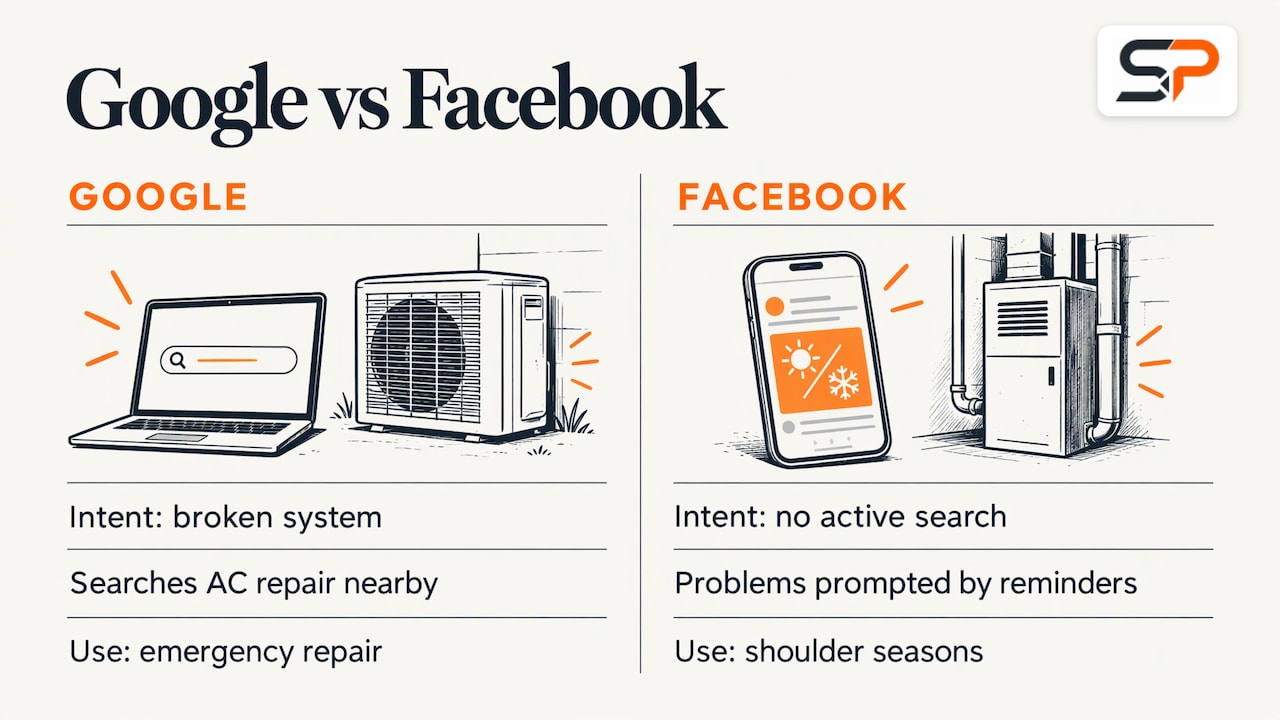
A homeowner searching Google for "AC repair near me" already has a broken system and a credit card in mind. A person scrolling Facebook has no such intent. They are reminded of a problem: the furnace is 15 years old, the AC struggled last August, the energy bill jumped.
That difference shapes everything. Facebook ads work best for offers that make a homeowner act before the problem becomes an emergency: tune-ups, maintenance memberships, system replacement financing, duct cleaning, a free second opinion on a quote. Emergency repair is better served by search. Facebook is where you fill the shoulder seasons and keep techs busy in spring and fall.
It also changes who calls you. People who come from an ad often expect to be contacted, because they filled in a form. That is an advantage if you reach them quickly and a liability if you do not.
Step 1: Get the basics in place before you spend
Meta will not run lead ads without a few things, and homeowners will judge you on the rest. Before you launch:
- A Facebook Page with recent posts, so the ad does not point to an empty profile.
- A Meta ad account with a payment method on file. You pay Meta directly for ad spend.
- A link to your privacy policy, which lead forms require.
- A phone number that a person answers during business hours.
- Two or three real photos of your crew, trucks or finished installs.
This is also where many contractors stall, because the ad account, Page permissions and business verification can take an afternoon of clicking. When we set up Meta campaigns for clients, the customer keeps control of their own ad account and pays Meta directly, so the spend and the data stay theirs.
Step 2: Pick one offer for one season
The most common mistake in HVAC Facebook ads is running a generic "We fix heating and cooling" message. Pick one offer that a homeowner can say yes to this week.
Good examples:
- Spring: AC tune-up at a fixed price, booked this week.
- Fall: furnace safety inspection and tune-up.
- Any time: a maintenance-plan offer, a financing option or a rebate you can help the customer claim.
State the price or the benefit in the headline. A fixed price tells the homeowner what they are signing up for and filters out people who want a free diagnosis. Change the offer when the season changes, and refresh the creative as well, because the same ad shown repeatedly to the same neighborhood tires out.
A practical starting structure, which Service Nation recommends for home-service contractors, is one lead-generation campaign built around a strong offer, plus a small retargeting campaign aimed at people who visited your website. Keep budgets modest until you can see what is working.
Step 3: Set the campaign up for local, lead-ready traffic
In Meta Ads Manager, choose the Leads objective and use Meta's built-in lead form (called Instant Forms). The form opens inside Facebook or Instagram with the person's name and contact details already filled in, so a homeowner can finish in a few taps. Sending people to a website instead adds taps and loses people between the ad and your phone number.
A call or conversion campaign can work, but only when you have a clean, mobile-friendly site with a visible phone number and an obvious booking path, as Service Nation notes. For most shops starting out, the built-in form is the shorter road.
Location and audience
- Drop a pin on your shop or the center of your service area.
- Set the radius to the distance your techs will drive for a standard visit. For many shops that is a modest radius, not the whole metro.
- Target people who live in that area, not people who were merely traveling through it.
- Start with a broad age range and few interest filters. Service Nation advises starting broad, around ages 28 to 65 and up, because narrowing too far tends to raise costs and limit what Meta's system can learn.
- Once leads are coming in, add custom audiences, such as your customer list or website visitors, and lookalike audiences built from them. Watch ad frequency, because results usually decline when the same people see the ad too many times.
Homeowners are the target. Renters rarely authorize a system replacement, but broad targeting lets Meta find the people who respond, and your offer wording does the filtering.
Budget
Choose a daily budget you can hold for at least two weeks. Meta's delivery needs time to settle, and changing the budget or the audience every day resets that learning. Decide up front what a booked visit is worth to you: if an average maintenance-plan customer or system replacement brings in several hundred or several thousand dollars, you can afford a much higher cost per lead than a shop selling one-off repairs. Our guide to calculating cost per lead shows how to set that ceiling from your own close rate and job value.
Step 4: Build creative that proves you are local and real
For HVAC, the picture does most of the selling. Jobber recommends real jobsite photos and videos, noting they tend to beat polished graphics and give homeowners proof of your work. Before-and-after shots of a dirty coil, a cramped attic install or a cleaned-up equipment pad do this well.
A reliable ad has four parts:
- A real image or short video of your crew or a finished job, with a person in it if possible.
- A headline that carries the offer, such as the tune-up and its price.
- Two or three lines of copy that name the area you serve and what happens next.
- A direct call to action, such as "Call Now" or "Message Us to Book" (Jobber lists both among its calls to action).
Test two or three creatives against each other, not ten. With a modest budget, too many variations starve each one of data.
Step 5: Keep the lead form short, with one filter question
Every extra field costs you leads, and every missing field costs you quality. A form that works for most HVAC shops asks for:
- First name
- Phone number
- ZIP code
- One qualifying question, such as "Gas furnace or heat pump?" or "When do you need service: this week, this month, or just checking prices?"
The timing question is the most useful. It lets you call "this week" leads first and treat "just checking prices" leads differently. ZIP code stops you from calling people outside your area.
Meta lets you add many more questions, but each one is another reason to quit. Two or three multiple-choice questions beat a long form. A published form cannot be edited, so duplicate it when you want to change something and keep the original for comparison.
Finally, write the thank-you screen so it says what happens and when: a comfort advisor from your office will call within a stated window. That sentence is a promise. Keep it.
Step 6: Follow up in minutes, not days
This is where most HVAC Facebook campaigns are won or lost. A homeowner who filled in a form on their phone is probably still holding it. A competitor's ad is one scroll away. Facebook leads are impulse inquiries, and they cool quickly.
A workable follow-up routine:
- Instant text or email acknowledgment that names your company and says a person will call shortly.
- A phone call within minutes during business hours, not at the end of the day.
- A second attempt later the same day if there is no answer, then a short sequence over the following days.
- A log of every outcome: booked, quoted, no answer, wrong number, not in the area.
The practical problem is that a technician in a crawl space cannot answer a lead from a form. A dispatcher is on another line. Leads arrive at night and on weekends. The routine fails not for lack of will but for lack of hands.
That is the problem our system is built around. Contractor Engine combines industry-specific lead generation with a CRM that contacts new inquiries within five minutes, automates qualification checks and organizes follow-up, so invalid inquiries do not eat your day. Our follow-up is consent-based, and SMS goes out only where it is eligible. For a deeper look at the lead side, read our guide to HVAC lead generation.
A note on text messages: texting homeowners is regulated in the United States, and consent matters. Collect permission in the form or on the call, and keep your messages tied to the request the homeowner made.
Step 7: Measure what matters every week
Cost per lead is the number Facebook shows you, and it is the least useful one. Track three numbers weekly:
| Metric | What it tells you |
|---|---|
| Leads in | Whether the ad and form are getting attention |
| Visits booked | Whether your follow-up converts the lead into a real appointment |
| Jobs sold | Whether the lead was the right kind of customer |
From those, work out cost per booked visit and cost per sold job. A campaign with an expensive lead that books half the time can beat a cheap one that books one in ten.
When the numbers disappoint, diagnose in order:
- Few leads: the offer, the creative or the budget is the problem.
- Many leads, few bookings: speed of follow-up, or an unclear form promise.
- Many bookings, few sales: the offer is attracting price shoppers, or the visit process needs work.
Treat the lead list as perishable data as well. Download leads regularly rather than leaving them sitting in Meta's lead center, and move them into your CRM so every contact has a status and a next step.
Common mistakes that waste HVAC ad budget
- Advertising to a radius wider than your crews can serve, then calling people you cannot help.
- Running a vague "we do everything" ad instead of one seasonal offer.
- Using stock photos of smiling models next to a fake-looking thermostat.
- Changing the budget and audience every few days.
- Letting leads sit until the evening or the next morning.
- Counting leads instead of booked visits and sold jobs.
- Pausing the campaign after a slow first week, before the system has had time to learn.
How we help HVAC contractors get this running
If you would rather not build the routine by hand, Contractor Engine is our HVAC offer. It connects industry-specific lead generation to lead verification, a CRM pipeline with appointment tracking, and rapid, consent-based follow-up by email and eligible SMS. We offer Meta campaign setup or management for contractors who want it, and you keep control of your own ad account and pay Meta directly. You can also watch the Contractor Engine overview before you decide.

Pricing for Contractor Engine is not published, so start on the Contractor Engine page to see how it fits your service area and crew size.
A realistic first 30 days
Week 1: finish the Page, the ad account and the privacy policy link. Pick one offer. Shoot a few real photos on your next jobs. Build the short lead form and write the thank-you screen.
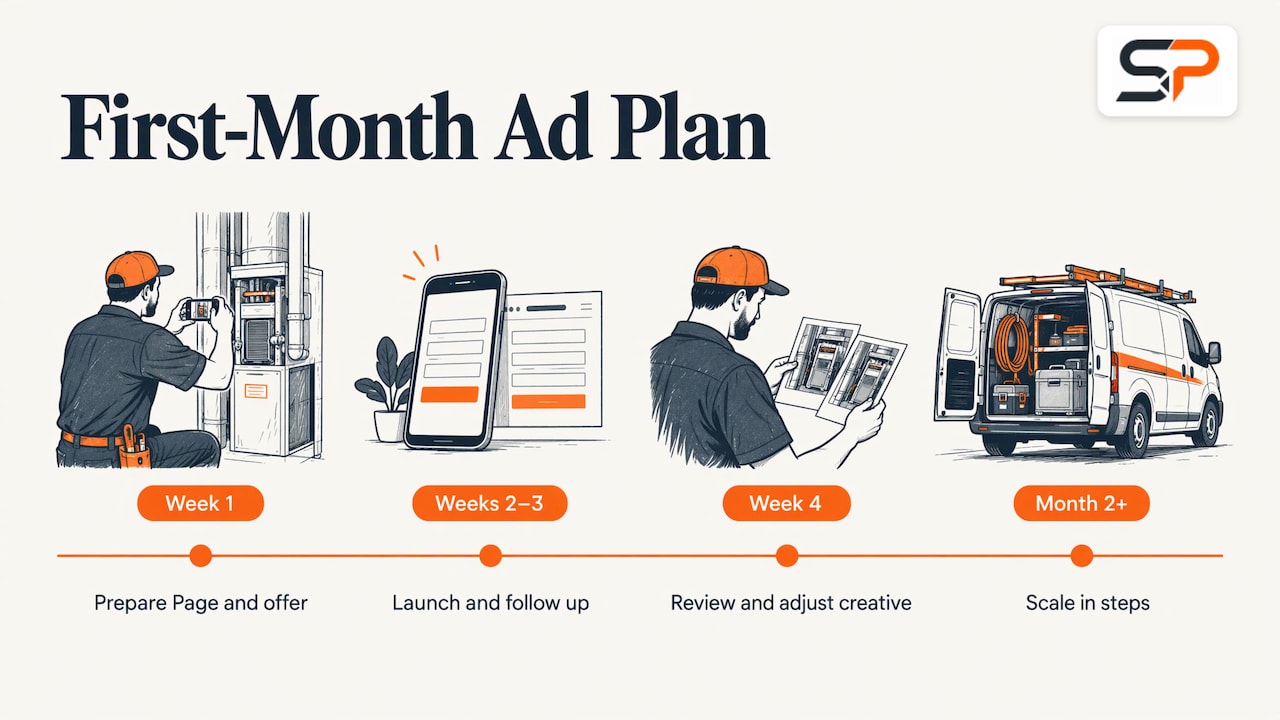
Weeks 2 and 3: launch with a budget you can hold. Do not touch it for the first few days. Call every lead the same day, ideally within minutes, and log the outcome.
Week 4: read your three numbers. Keep the creative that books visits, replace the one that does not, and add a small retargeting campaign for website visitors if you have enough traffic.
After the first month, you will know your cost per booked visit and can decide how much to scale. Scale in steps, not leaps, and keep the follow-up routine as fast at higher volume as it was at low volume.
FAQ
Do Facebook ads work for HVAC companies?
Yes, when the offer is specific and the follow-up is fast. They work best for planned work such as tune-ups, maintenance plans and replacement financing, where you are reminding a homeowner of a need. They are weaker for emergency calls, which usually start on search.
How much should an HVAC company spend on Facebook ads?
Choose a daily budget you can hold for at least two weeks without changes. The right number depends on the value of a booked visit and your close rate, so work backward from what a sold job is worth. Our cost-per-lead guide shows the calculation.
What should a HVAC Facebook lead form ask?
Keep it to first name, phone number, ZIP code and one qualifying question, ideally about timing or equipment type. Shorter forms bring in more leads and the timing question lets you call the most urgent ones first. Add a thank-you screen that tells people when you will call.
How fast should I follow up with Facebook leads?
As fast as you can, and within minutes where possible. These are impulse inquiries from a phone, and speed is what separates a booked visit from a lost lead. Our system contacts new inquiries within five minutes.
Sources
- How Service Contractors Can Use Meta Ads to Fill Schedules
- HVAC Social Media Marketing: How to Get Started