
Automated email follow-up is a set of emails that goes out on its own the moment a lead raises a hand, then keeps going on a schedule until the lead replies, books or opts out. For an insurance agent, an HVAC contractor, a commercial cleaner or a managed service provider, the point is simple: the first reply goes out in minutes, not whenever someone gets back to the desk. Our CRM is built around that idea, with contact inside five minutes of an inquiry, lead verification and automated email follow-up (plus SMS where eligible) in one pipeline. The rest of this guide shows how to set it up properly, whatever you run it on.
TL;DR
- Speed decides who wins the lead. Most businesses reply slowly or never, so an automatic first email is the cheapest advantage you can build.
- Trigger the first email at the moment of inquiry, then send two or three more over about two weeks, each with a different purpose.
- Stop the sequence the instant a lead replies, books or unsubscribes. Build that exit rule before you write a single email.
- Every commercial email needs an honest sender line, a real postal address and a working opt-out under the federal CAN-SPAM Act.
- Track reply rate, booked appointments and unsubscribes by sequence, and rewrite the weakest email each month.
Table of Contents
- Why the first email matters more than the rest
- What an automated follow-up sequence actually is
- How to automate follow-up after an inquiry
- How many emails, and when
- Writing emails that don't read like automation
- Staying on the right side of the law
- A note on Outlook, Gmail and spreadsheets
- What to measure
- Follow-up by industry
- Putting it to work with Secure Pipeline AI
- A one-week launch plan
- FAQ
- Sources
Why the first email matters more than the rest
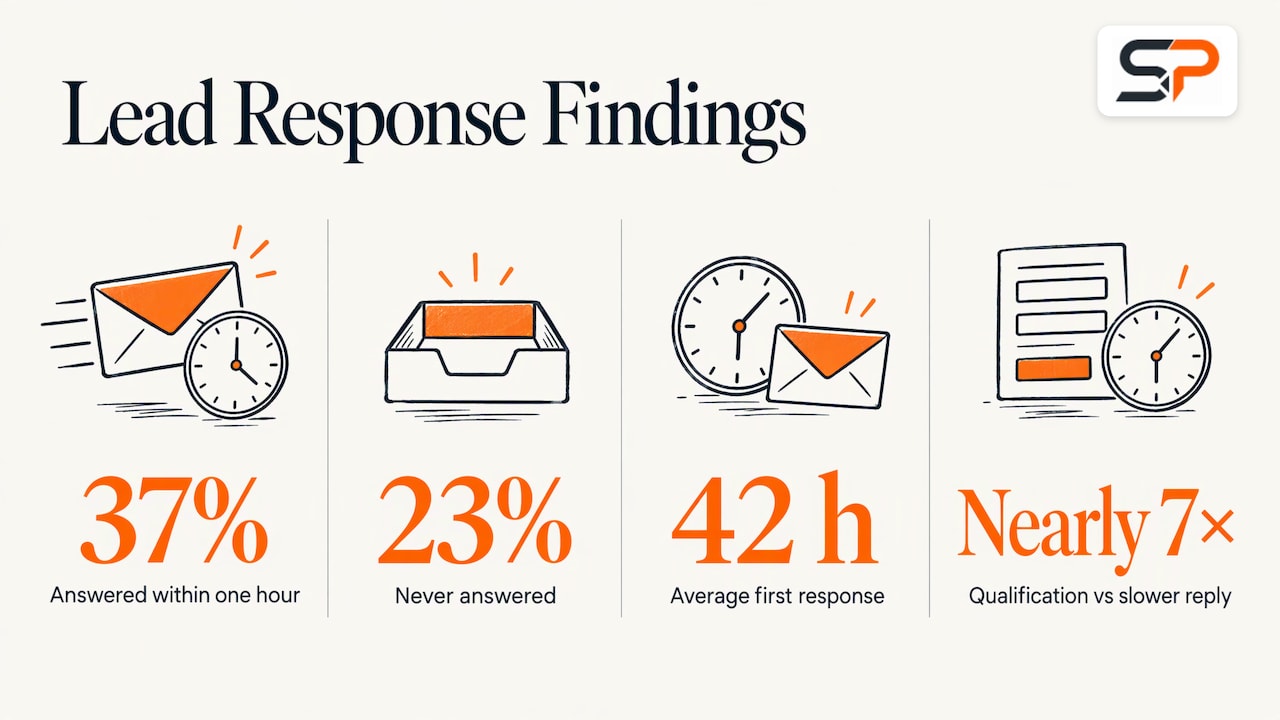
Most small businesses lose leads before the conversation starts. In the March 2011 Harvard Business Review audit of 2,241 U.S. companies, only 37% answered a web-generated test lead within an hour, 23% never answered, and the average first response was 42 hours. The same roundup reports a companion study of 1.25 million leads in which contacting a lead within an hour made it nearly seven times more likely to qualify than a slower reply.
Home services show the same pattern. A secret-shopper study of 466 U.S. home-services companies found only 60% responded within five days and 40% never responded at all. The same paper cites Aberdeen Group research reporting a jump of more than 25% in lead-to-sales conversion for companies that automated follow-up.
Those figures are older and come from specific samples, so treat them as direction, not a promise. The direction is clear, though. A lead who filled in a form is comparing you with two or three other providers right now. The one whose email lands first, and is useful, usually gets the call.
That is also why automation helps more than "being more disciplined." You can't answer a form at 9 p.m. from a job site or a client meeting. A system can.
What an automated follow-up sequence actually is
Three parts make up a working sequence:
- A trigger. The event that starts it: a form submission, a Meta lead form, a quote request, a missed call logged in your CRM.
- Timed messages. Emails that go out after set delays, written for where the lead is in their decision.
- Exit rules. Conditions that stop the sequence: a reply, a booked appointment, an unsubscribe or a bounced address.
People who say automated emails feel robotic are usually describing a failure in one of these three parts: a trigger that fires at the wrong time, copy that could be sent to anyone, or no exit logic, so a lead who already booked keeps getting "just checking in." The fix is design, not more volume.
How to automate follow-up after an inquiry
Here is the setup, step by step, for a service business that gets leads from a website, Meta ads or purchased verified leads.
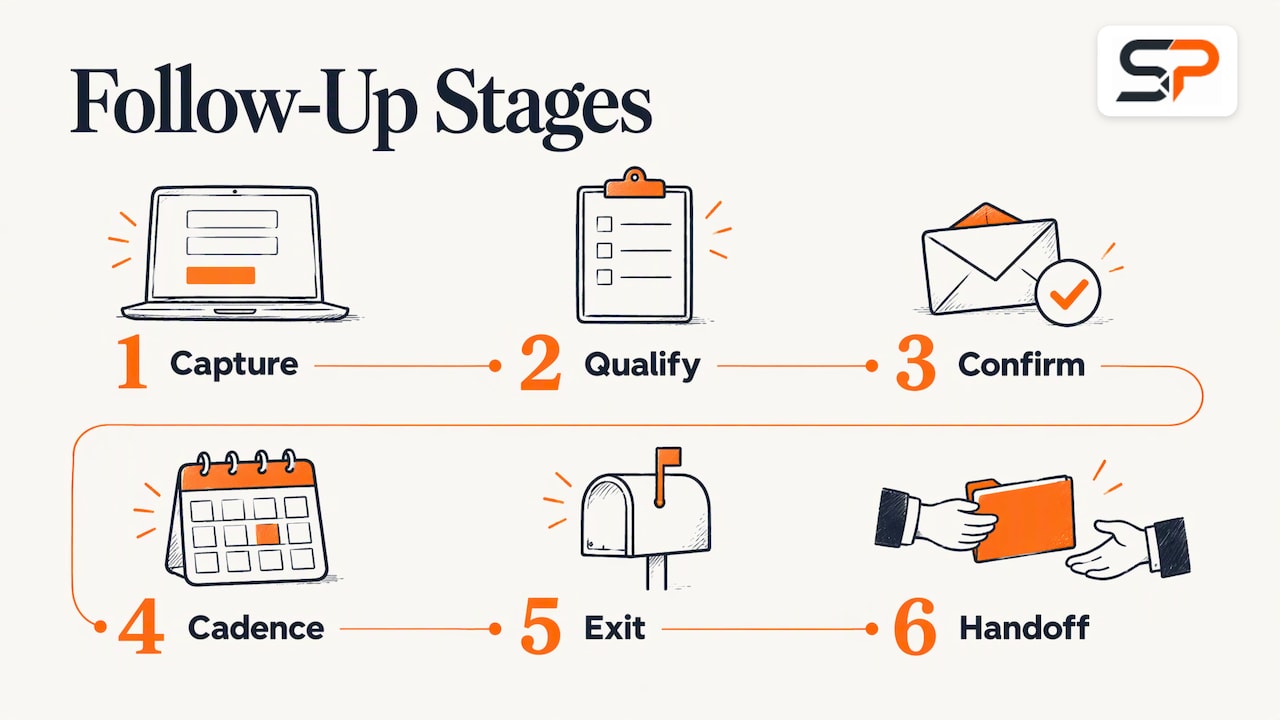
Step 1: Capture the lead in one place
Every inquiry has to land in a single list with the same fields: name, email, phone, service wanted, source and the time it arrived. Leads that sit across a form inbox, a Facebook notification and a spreadsheet get followed up unevenly, and automation can't fix what it can't see.
This is where our CRM does the heavy lifting. Leads are verified before they enter the pipeline, so your automation isn't spending emails on invalid addresses and made-up inquiries, and pipeline and appointment tracking sit in the same place as the follow-up.
Step 2: Decide what counts as a lead worth emailing
A bad email address bounces, and bounces damage the reputation of your sending domain. Check at least that the email is deliverable and that the lead asked about a service you actually provide in an area you cover. An HVAC contractor in Phoenix shouldn't email a request from Ohio. A commercial cleaner should separate "office, 8,000 square feet" from "my apartment." Our platform automates these qualification checks, which is the part most do-it-yourself setups skip.
Step 3: Send the first email immediately
The first message is a confirmation that is also a conversation starter. It should arrive within minutes, from a real person's name, and do three things: confirm you got the request, say what happens next and ask one easy question. Our system is built to contact leads within five minutes of an inquiry, which is the window the speed-to-lead research above argues for.
Step 4: Add the timed follow-ups
See the cadence section below for timing. Whatever the schedule, each email needs its own job. Repeating the first message three times is how sequences get marked as spam.
Step 5: Build the exit rules first
Test this before you turn the sequence on. Submit a test inquiry with your own address, reply to the first email, and confirm the next ones never arrive. Then submit another, book a time, and confirm the same. Then unsubscribe and confirm it holds. Our CRM tracks pipeline stage and appointments, so a booked lead moves out of the follow-up track automatically.
Step 6: Add a human handoff
Automation should get the lead to a phone call or an appointment, not replace it. Set a notification so that when a lead replies, someone on your team sees it and answers personally, the same day. For insurance, our guide to insurance appointment setting covers what happens after the reply.
How many emails, and when
Most lead sequences work best when short. A practical cadence for a service business:
| Timing | Job | |
|---|---|---|
| 1 | Within minutes | Confirm the request, set expectations, ask one question |
| 2 | Day 3 | Add something useful: a short answer to a common question, a price range, a relevant example |
| 3 | Day 7 or 8 | Offer a specific next step, such as two appointment times |
| 4 (optional) | Day 14 | A polite last note for higher-value leads, with an easy way to opt out |
This is a working rule of thumb, not a law. Higher-value, longer-cycle sales, such as commercial insurance or a multi-year cleaning contract, can justify a slower sequence that runs a month or more. A one-day emergency AC repair lead needs the opposite: a fast first email and a phone call, because the buyer decides in hours.
Two more habits keep a sequence from feeling pushy. Send during business hours in the lead's time zone, and keep every email short enough to read on a phone without scrolling much.
Writing emails that don't read like automation
A merge field with a first name isn't personalization. The substance is what the lead cares about: the service they asked for, their type of building or policy, their city. If you collect that information in the form, you can reference it in every email.
Some practical rules:
- Use the lead's own words. If the form asked "What do you need?", echo the answer: "You asked about replacing a 15-year-old furnace."
- Ask one question per email. Questions are easier to answer than statements.
- Match the industry. An agent writing about Medicare should mention enrollment timing in plain language. A contractor should name the system type. A cleaner should ask about frequency and square footage. An MSP should ask how many users and which tools are in play.
- Keep the subject line honest. It must reflect what's inside, which is also a legal requirement (see below).
- Sign as a person. Use a real name and a reply-to address someone reads.
Example for an HVAC lead, sent a few minutes after a form submission:
Subject: Your AC repair request
Hi Maria, this is Dan from Ridgeline Heating & Air. We got your request about the unit that's blowing warm air. Is it running at all, or has it shut off completely? A one-line answer helps us send the right technician. Replying to this email works, or call us at the number below.
It's short, specific and asks one question. Industry-specific campaigns work the same way: when the ad, the form and the first email talk about the same thing, the lead doesn't feel they've been dropped into a generic funnel. Our guide to HVAC lead generation shows how that connection starts at the ad.
Staying on the right side of the law
Follow-up emails to prospects are commercial messages, and the CAN-SPAM Act applies to them. According to the FTC's compliance guide, the law covers all commercial email, with no exception for business-to-business messages. The same guide lists the core requirements: accurate header information, a subject line that matches the content, identification of the message as an ad where it is one, a valid physical postal address and a clear way to opt out.
Two practical consequences for your sequence:
- Honor opt-outs fast. Build the unsubscribe to take effect across every sequence for that address, not just the current one.
- Keep your records. Store when and how each lead gave their contact details.
Text messages have separate rules and require consent, which is why our texting is limited to eligible leads. If you add SMS to a sequence, do it only where the lead has agreed to receive texts. Ask your attorney about the specifics for your state and your industry, particularly for insurance, where state rules on solicitation can add requirements.
A note on Outlook, Gmail and spreadsheets
Many owners start by trying to automate follow-up in the inbox they already use. Outlook's built-in automatic replies are designed for out-of-office use: Microsoft describes them as a way to notify senders that you're unavailable, sent once to each sender. That's a single reply, not a timed sequence that watches for replies and bookings. A sequence needs a trigger, delays and exit rules, which is what a CRM provides.
The difference shows up when volume grows. With 5 leads a week, you can remember who has been emailed. With 50, you can't, and that's when leads slip through. A CRM tied to your lead source keeps the history in one record, so anyone on your team can see exactly what the lead has received.
What to measure
A sequence is a system, so measure it like one. Track these monthly, per sequence:
- Reply rate: the share of leads who respond to at least one email.
- Booking rate: the share who book an appointment or call. This is the number that pays the bills.
- Unsubscribe and bounce rates: a rising number means your list quality or your copy has a problem.
- Time to first contact: it should be minutes, every time, including nights and weekends.
- Cost per booked appointment: it ties follow-up back to your ad spend. Our guide to cost per lead explains how to calculate it.
Benchmarks vary a lot by industry and lead source, so use your own first month as the baseline. Then change one thing at a time: a subject line, the delay before email two, the closing question. Compare against the baseline, keep what wins and move on to the next email.
Also set up your sending domain correctly. SPF, DKIM and DMARC are DNS records that prove your emails come from you. Without them, even a well-written sequence can land in spam. Your email provider or IT person can add them in an hour.
Follow-up by industry
Insurance agents
Timing and compliance matter most. Verified leads arrive with the line of business already set (P&C, life, Medicare, annuities, commercial or crop), so your first email can speak directly to it. The goal of the sequence is an appointment, so each email should offer a time, not a brochure.
HVAC contractors
Urgency varies. A repair request needs a first email and a call within minutes. An installation or replacement quote has a longer decision cycle, so a Day 3 email with a price range or financing information fits. Our Contractor Engine is built for contractors who want qualified leads and fast follow-up in one system.
Commercial cleaning companies
Commercial buyers often need a walkthrough before pricing. Use the sequence to get that walkthrough on the calendar, and track which stage each prospect is in so no quote goes silent. Our cleaner plans, Starter and Launch, are built around organized follow-up.
Managed service providers
MSP buying cycles run longer, so a four-email sequence over two to four weeks with a different angle each time (security, uptime, cost, onboarding) tends to fit. Consistent contact matters more than speed alone. MSP Growth is our offer for that audience.
Putting it to work with Secure Pipeline AI
If you'd rather not stitch together a form tool, an email tool, a calendar and a spreadsheet, our CRM puts lead verification, automated email and eligible SMS follow-up, and pipeline and appointment tracking in one place. We also build the Meta campaigns that feed it, and you keep control of your own ad accounts and pay Meta directly.
For insurance agents, the published prices are:
- Email Starter: $79 one-off
- Email + Text Starter: $97 one-off
- Verified leads, per lead: P&C $6, Life $8, Medicare $9, Annuities $12, Commercial $15, Crop $28
- Done-for-You Meta Ads Setup: $297 one-off
You can see the details and register on the Policy Engine page.

Contractors can start at Contractor Engine, cleaners at the cleaning plans page and MSPs at MSP Growth.
A one-week launch plan
- Day 1: List your lead sources and pick one to automate first, the one that produces the most leads.
- Day 2: Write the first email and the exit rules. Keep the first email under 100 words.
- Day 3: Write emails two and three. Each one gets a different job.
- Day 4: Add the sender identity, postal address and unsubscribe link, and set up SPF, DKIM and DMARC.
- Day 5: Run test inquiries through every path: reply, book, unsubscribe.
- Day 6: Turn it on for live leads and set up a same-day alert when a lead replies.
- Day 7 and after: Check the numbers weekly for the first month, then monthly.
FAQ
How many automated follow-up emails should I send?
Three or four over about two weeks suits most service businesses: one right away, one around Day 3, one around Day 7 or 8 and an optional last note around Day 14. Longer sales cycles, such as commercial insurance or MSP contracts, can stretch the schedule. Stop the sequence the moment the lead replies or books.
How fast should the first automated email go out?
Within minutes. The research on response times shows that businesses answering within the first hour are far more likely to qualify a lead than those who wait. Our system is set up to contact leads within five minutes of an inquiry.
Do automated follow-up emails have to follow any laws?
Yes. In the United States, CAN-SPAM covers commercial email, including messages to businesses. You need accurate sender information, an honest subject line, a physical postal address and a working opt-out. Text messages need consent as well.
Can I automate follow-up emails in Outlook?
Outlook's automatic replies are made for out-of-office notices and send one reply per sender. A timed sequence that stops when someone replies or books needs a CRM with triggers and exit rules.
Sources
- Speed-to-Lead Benchmarks 2026: Sourced Response-Time Data
- Speed to Lead in Home Services
- CAN-SPAM Act: A Compliance Guide for Business (FTC)
- How to set up out of office automatic replies in Outlook (Microsoft Support)